You can also download this here.
A customer has requested the ability to limit the list of reveals available for selection to reduce the risk of their staff selecting a reveal that they don’t supply.
This can be done, however as the reveals are in the 00 Capral library, these changes will revert back to defaults at each update.
There is an extensive list of reveals available in the CRE8 database. In some cases, the list is far more extensive than what any customer is willing to offer. To reduce the likelihood of a staff member selecting a reveal that is not in their offer, it is possible to limit the list of available reveals.
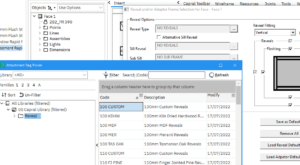
The list of reveals available for selection are defined in the Attachment Bag browser. The start of the list is shown below however there are over 70 different size/material types in total.
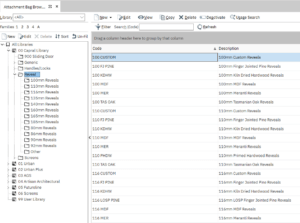
Hiding Reveals
- To remove these from selection in the reveal picker, firstly navigate to the Attachment Bag browser which is accessed through the Resources menu.

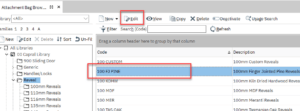
2. Select the reveal that you want to hide, and then select Edit.
3. Tick the box beside Hide From Pickers.
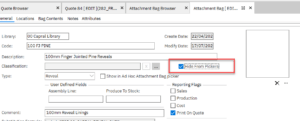
- You will still see the reveal in the Attachment Bag browser however it will not be available in the Attachment Bag pickers.
(A ‘picker’ is the list of available items presented when you make a selection. The reveal picker would be displayed when settings quote or item defaults, or run the Reveal or Subframe macros.)
- As you can see after running the Reveal macro, the 100 FJ PINE reveal is no longer available for selection.